

Free Digital Hall Pass and Classroom Management Tools That Actually Help
 Andy Navarro · Classroom & Free Tools ·
A free digital hall pass, noise meter, classroom timers and a name picker, plus the routines that make classroom management tools work.
Most classroom management problems aren't big. They're small things that happen fifty times a day: a student asking to go to the restroom in the middle of your mini-lesson, a work period that gets louder and louder, a transition that takes six minutes instead of one. A digital hall pass and a few free classroom management tools won't fix a class on their own, but they take those small decisions off your plate so you can actually teach.
Here's how I think about each one, the routine that goes with it and the free tools I use.
The rule underneath every tool
A tool only works if it supports a routine students already know. Before you put anything on the board, decide three things:
- What does the student do? Exactly, step by step.
- What do you do? Ideally, nothing. That's the point.
- What happens when it goes wrong? Decide this before it happens, not in the moment.
Teach the routine, practice it in the first week and then let the tool hold it in place.
Hall passes: paper vs. a digital hall pass
The restroom pass is the most interrupted routine in any classroom. A student raises a hand, you stop talking, you say yes or no, you hand over a lanyard and then you try to remember when they left. Multiply that by six periods.
A good hall pass routine looks like this:
- Students don't leave during direct instruction or the first and last few minutes of class, unless it's an emergency.
- Only one student is out at a time.
- Students sign out and sign back in themselves, without interrupting you.
- You have a record if a pattern shows up.
A paper pass and a sign-out sheet on a clipboard can do all of that, and plenty of teachers run them well. The weak spots are the record (hard to read, easy to skip) and the clock (nobody writes down the return time).
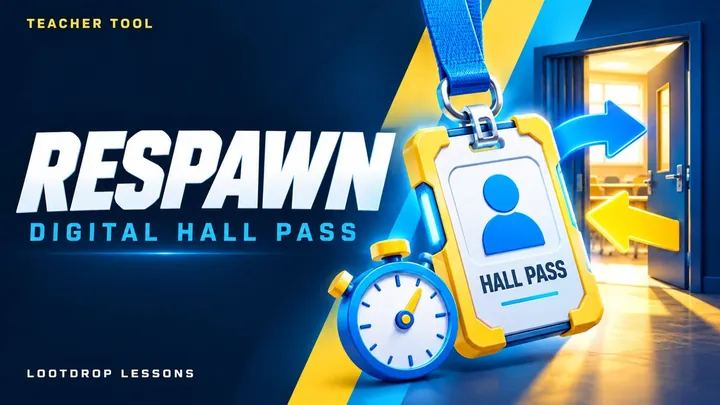
That's why I built RESPAWN, a free digital hall pass. Students tap their name on a classroom screen or scan the barcode on their ID badge to sign out, and tap again when they come back. You get a live board with timers, overdue alerts and a one-at-a-time limit. You can set keep-apart pairs who can't be out at the same time, even across rooms, and it keeps 30 days of pass history you can export to a spreadsheet. Rosters and history stay in your browser.
The free plan covers two classes: your first class gets every feature, and your second gets the student screen, the live board and today's history. More classes need All-Access, and so does starting a Team, where teachers and admins share classes to see everyone who's out and follow one student's day. Anyone who joins a Team is free.
If you'd rather keep it paper, my printable hall pass is a Word file you can edit to fit your room.
Noise levels: show it, don't say it
"It's getting loud in here" works about twice before students stop hearing it. Noise is easier to manage when it's visible. Set clear voice levels for different parts of class (silent for tests, whisper for partner work, normal voices for group work) and post them.
A noise meter on the board does the reminding for you. HushHushPlush is my free classroom noise meter game. You allow the microphone, set a noise limit or calibrate it in five seconds and pick one of 12 illustrated worlds. Quiet brings little creatures called Hushies into the scene, and noise sends them running. Each class period keeps its own collection and races the others on a leaderboard to fill the Hushie Codex, which has 234 to collect.
It has a built-in timer and a spot for your own note, so the directions stay on the screen. It only measures how loud the room is. Nothing is recorded, saved or sent anywhere. Press P for a small window that floats over your slides.
A tip: don't set the limit so low that the class can never win. The goal is a working hum, not silence, unless it's a test.
Timers: the most underrated classroom management tool
A visible timer changes how students work. "Take a few minutes" means nothing. "You have four minutes" with a countdown on the board means something. Timers help with:
- Warm-ups and bell ringers: students know exactly how long they have.
- Transitions: give a 60-second countdown to clean up or move to groups, and make it a challenge to beat.
- Stations: everyone rotates at the same time without you shouting.
- Independent work: students who struggle with pacing can see the time left.
Timer Arcade is my free set of classroom timers with no ads. It has countdowns with presets, labels, a +1 minute button and an option to count up after zero so you can see how far over you went. There are 12 visual themes, including a boss health bar and an hourglass, plus end sounds, a warning chime, last-10-seconds ticks, a stopwatch with laps and a big clock. Pro adds station rounds, 12 timers at once, a pop-out timer and more themes.
If you'd rather never start a timer again, BellRun runs your whole day by itself. Type your bell schedule once, or start from a 7-period, 8-period or block template. It counts down to a few minutes before the bell (you pick how many) and says Wrap up, turns red in the last five minutes and runs back-to-back splits for your warm-up, lesson, activity and exit ticket. It starts over every period on its own, and a hover window stays on top of your slides. Pro adds A/B and early-release schedules by weekday and different splits per period.
Calling on students fairly
Students notice who you call on. If it's always the same few hands, the rest of the room learns they can check out. Random calling keeps everyone ready, and it takes the personal sting out of being picked.
Some teachers use craft sticks in a cup. That works fine. Loot Spin is the digital version: paste your class list and spin a wheel, and the picked name pops up with confetti and comes off the wheel so everyone gets a turn. Tap a name to mark that student away today, and absent students get skipped. Saved class lists and pick history are free. You can also spin for discussion questions, topics or classroom jobs.
Pair it with wait time. Ask the question, give everyone thirty seconds to think or jot, then spin. Nobody gets caught off guard, and everyone had a chance to prepare.
Putting it all together
You don't need every tool on day one. Start with whichever routine is costing you the most time. For a lot of teachers that's the hall pass. For others it's noise during group work. Add one tool, teach the routine, give it two weeks and then add the next.
A simple setup that works in most rooms:
- A hall pass screen on a spare device by the door.
- A period timer running in the corner of the board.
- A noise meter during work time.
- A name picker for discussion.
All of these are free and run in your browser. RESPAWN, HushHushPlush, Timer Arcade, BellRun and Loot Spin are below, along with the printable hall pass if your room runs on paper.