Five Short Constructed Responses: The Scarlet Ibis
$2.50

Classroom management · Grades 3–8 · PDF + Google Slides · Free
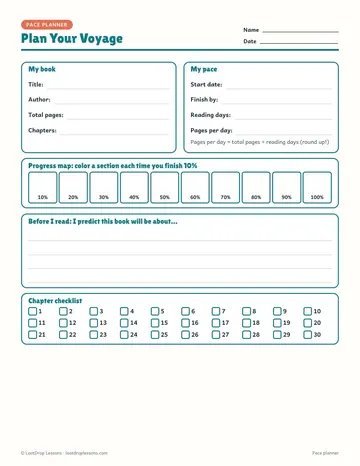
Keep every reader on track with one simple system. Students start with a pace planner that turns their deadline into pages per day, plus a progress map and chapter checklist.
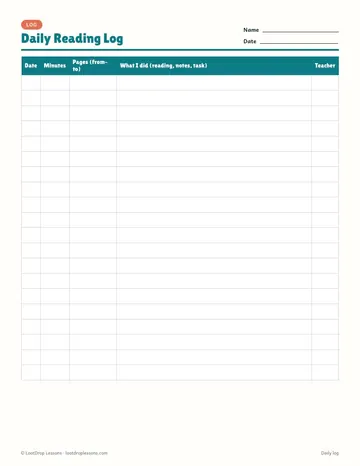
The daily reading log has room for the date, minutes, pages and what they did each session, with a column for your initials.
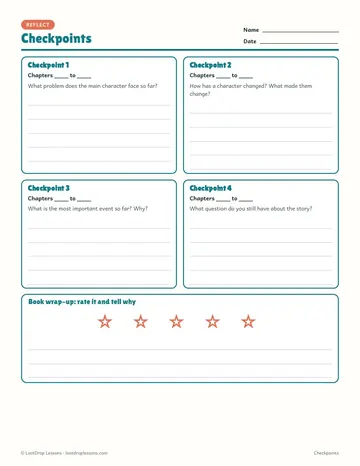
Four checkpoint reflections keep thinking visible, not just page counts, and a book wrap-up closes it out. Works with any book.
Topics: literature, reading, ela, slides, powerpoint, presentation, elementary, middle, school, grade, 3, 4, 5, 6, 7, 8, free
How to run First Chapter Friday in upper elementary, middle or high school: choosing books, what students do while they listen, and how to keep it going all year.
Read Across America Week ideas for K–8: dress-up days with a purpose, reading goals, book tastings, novel study choice boards, family reading activities and classroom reading challenges.
A free Accelerated Reader alternative: students log books with a class code, you hold book conferences, and finished books earn points.
Built for grades 3–8 (elementary and middle school ELA). Format: PDF + Google Slides. Free to download. Ways to use it: class novels; book clubs and literature circles.
Grades 3–8, so it fits elementary and middle school ELA classes.
PDF + Google Slides.
It is free.
Pace planner + progress map, Chapter checklist, Daily reading log, 4 checkpoint reflections, Book wrap-up, Google Slides version.
Yes. The digital version works in Google Slides or PowerPoint, so students can type their answers and you can assign it in Google Classroom.
Popular ways to use it: Class novels; Book clubs and literature circles; Independent reading; Reading accountability.